
How to create assets in Aivie:
- In the sidebar, under Components, select the “Assets” menu item.
- Create a new asset by clicking the “+New” button in the upper right corner.
- Upload your asset via drag-and-drop, e.g. as a PDF file.
- Select the name and alias for the asset’s URL.
- Select a category.
- Select “Yes” to publish your asset.
- Click “Save & Close”.
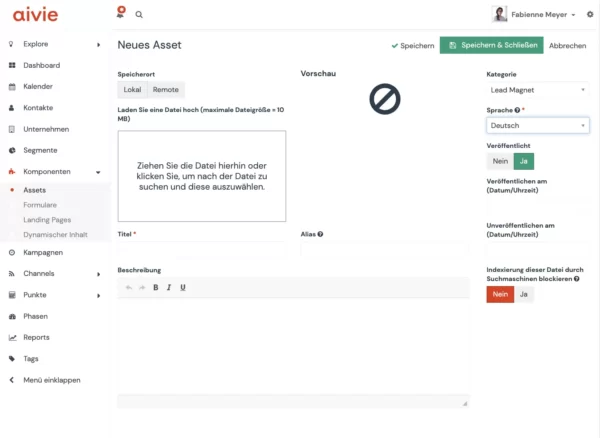
Additional information about creating an asset
- The asset is given a URL and can be incorporated into e-mails, for example. The download URL also allows you to preview the asset – clicking the link opens the asset in a new window.
- Assets are automatically downloaded when clicked. To view, add ?stream=1 to the URL.
- The title of the asset can be set, as well as a description and an alias, as above with the categories. Assets can only be assigned to published categories, so the category selection drop-down list does not include unpublished categories.
- You can also specify the language, whether the asset is published or unpublished, and whether it should be published or unpublished on a specific date or time. E.g. this is relevant for seasonal content.
- Search engines crawl the content of various files such as PDFs, etc. If you don’t want your files to be displayed in the search results, uncheck the corresponding option for indexing by search robots.
