Description
WooCommerce marketing automation with real purchase data
The Aivie Mautic WooCommerce plugin connects your WooCommerce shop with Aivie/Mautic. As soon as an order is created, paid, or fails, contacts and order data are automatically transferred to Aivie Commerce.
This lets you trigger targeted marketing automation campaigns from WooCommerce data: welcome sequences, reactivations, post-purchase follow-ups, failed payment reminders, or segments based on products, revenue, and order history.
For marketing teams, this means fewer manual exports and more relevant communication. For CTOs, the integration stays clean, transparent, and controllable.
Automatically sync WooCommerce orders to Aivie/Mautic
The plugin transfers relevant customer data from WooCommerce to Aivie/Mautic. This includes contact information, order status, cart values, payment method, subscriptions, currency, products, and secure metadata.
If Mautic tracking is already active on the website, the plugin can adopt the existing mtc_id from the browser session. This assigns an order to an existing contact instead of unnecessarily creating duplicate contacts.
This is especially valuable when visitors first interact anonymously with your website and later make a purchase in the WooCommerce checkout.
Use orders, products, and subscriptions for e-commerce marketing automation
The plugin sends WooCommerce line items as Aivie Commerce order items. This makes products, variants, and relevant attributes usable for campaigns.
Supported features include:
- WooCommerce orders
- failed payments
- paid orders
- WooCommerce Subscriptions
- renewal orders
- variable products
- variable subscriptions
- product attributes and secure metadata
This allows you to segment contacts in Aivie/Mautic by purchased products, order value, subscription status, or purchase behavior, for example.
Secure connection between WooCommerce and Aivie/Mautic
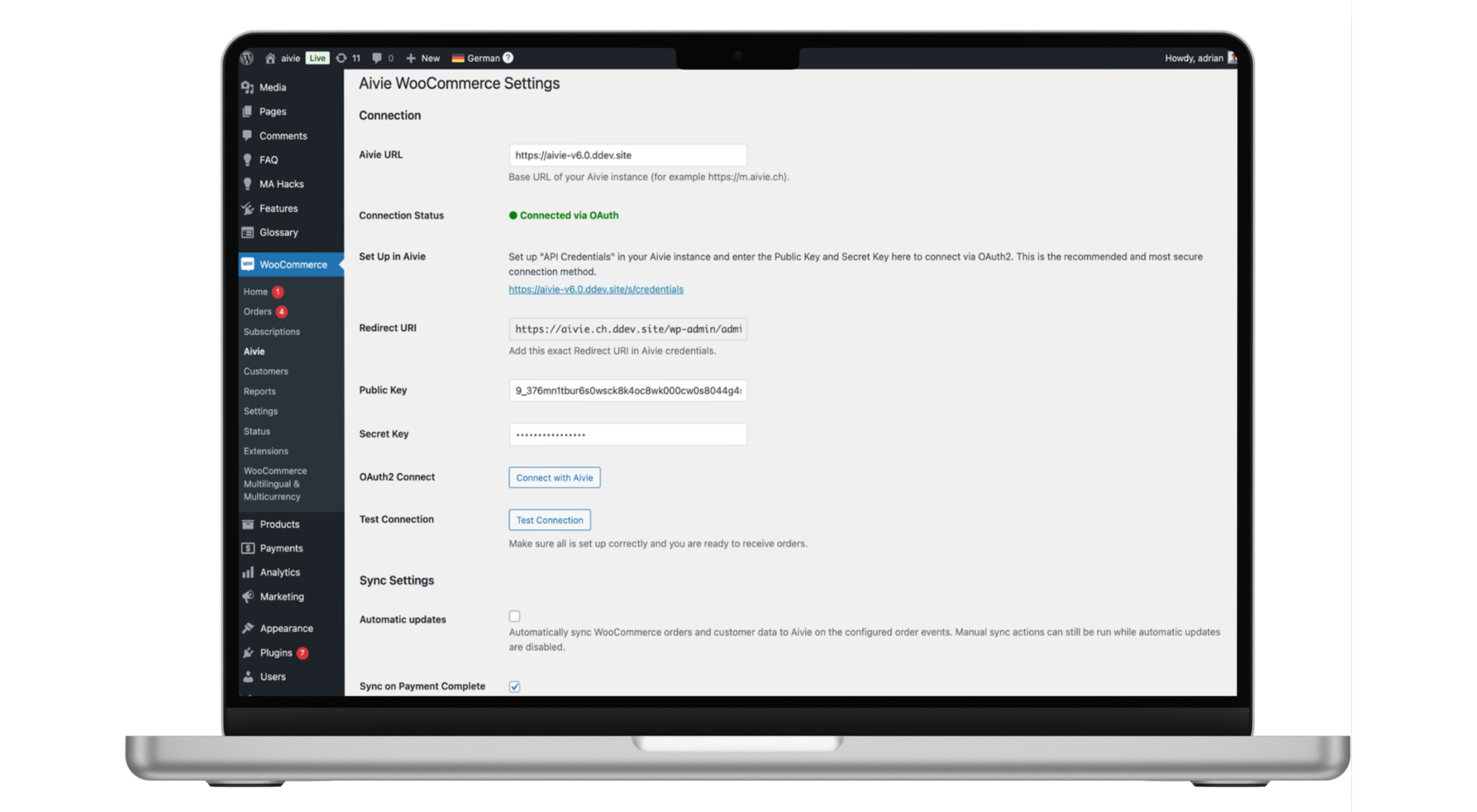
The connection uses OAuth 2.0 Authorization Code Flow. For API setups, a manual bearer token is available as an alternative.
The plugin doesn’t send any data until the connection has been set up by an administrator and automatic synchronization has been enabled.
Additionally, sensitive metadata is automatically excluded. This includes passwords, tokens, secrets, API keys, card numbers, CVV values, IBANs, or account numbers.
Stable operation with retry, logs, and WP CLI
If the Aivie/Mautic API is temporarily unavailable, network errors and server errors are automatically retried via the WooCommerce Action Scheduler.
For technical teams, the plugin offers:
- test connection button in settings
- manual synchronization per WooCommerce order
- logs under WooCommerce > Status > Logs
- WP CLI commands for debugging and backfills
- compatibility with WooCommerce HPOS
- participation in WordPress export and deletion processes for personal data
Who is the Aivie for WooCommerce plugin suitable for?
The plugin is suitable for WooCommerce shops that want to use their e-commerce data directly in Aivie/Mautic.
Typical use cases:
- follow-up emails after a purchase
- reactivation of inactive customers
- campaigns by product category
- segmentation by revenue or order frequency
- reminders for failed payments
- subscription lifecycle campaigns
- better attribution through Mautic tracking ID
- conversion tracking with WooCommerce data
Aivie instead of isolated shop communication
WooCommerce manages orders. Aivie turns them into actionable communication along the customer journey.
This turns shop data into concrete marketing automation triggers: purchased, not purchased, renewed, canceled, failed, repurchased, or high-value.
The Aivie Mautic WooCommerce plugin connects e-commerce, CRM, and marketing automation in an open, flexible setup.
Features
- Automatic synchronization of WooCommerce contacts and orders
- Support for payment complete, failed order, and new order events
- WooCommerce Subscriptions optionally supported
- Renewal orders and subscription lifecycle events
- Variable products and variable subscriptions
- Transfer of WooCommerce line items as Aivie Commerce order items
- Use of Mautic tracking ID
mtc_id - Protection against duplicate contacts
- Secure metadata under
attributes - Automatic exclusion of sensitive data
- OAuth 2.0 connection
- Bearer token fallback
- Test connection button
- Manual synchronization per order
- Automatic retry logic via Action Scheduler
- WP CLI commands
- HPOS compatible
- WordPress GDPR export and erasure integration
FAQ
Do I have to buy the plugin?
No. The plugin is available for free in the WordPress Shop. With this product, you purchase setup support from Aivie.
Does the plugin work without WooCommerce?
No. WooCommerce must be installed and active.
Does the plugin work with self-hosted Mautic?
Partially. Contacts can be created and updated. Full order synchronization is designed for Aivie Commerce. For self-hosted setups, the Aivie Commerce plugin is available separately.
What data is sent to Aivie?
Contact fields from the order, order totals, currency, payment method, line items, status, secure order metadata, and secure item metadata. Sensitive data is excluded.
What is the Mautic tracking ID?
The Mautic tracking ID is a contact ID stored in the browser via Mautic tracking. The plugin can adopt this ID at checkout and send it with the order.
Does the plugin support WooCommerce HPOS?
Yes. The plugin is compatible with WooCommerce High Performance Order Storage.
What happens if the Aivie API is unavailable?
Temporary network errors and server errors are automatically retried. Validation errors and authentication errors are not automatically retried.
Try it now
Use Aivie for free for 30 days
Lass deine Kontakte nicht warten.

Kostenlos mit Aivie starten.
Nutze Aivie 30 Tage lang kostenlos und prüfe wie du dank Aivie deine Kontakte gezielt erreichen kannst. Aivie bietet dir schon im Trial alle Möglichkeiten der Vollversion.
Probier es jetzt einfach aus.
Our T&Cs apply: https://aivie.ch/en/terms-and-conditions/