
With Aivie, you can differentiate contacts directly in the campaign according to their Last Active Date and thus send active and inactive contacts different emails.
In Aivie, you can send different emails within a campaign depending on how long a contact has been inactive. For example, you can send a different message to a contact who has not been active for a month than to one who was still active today.
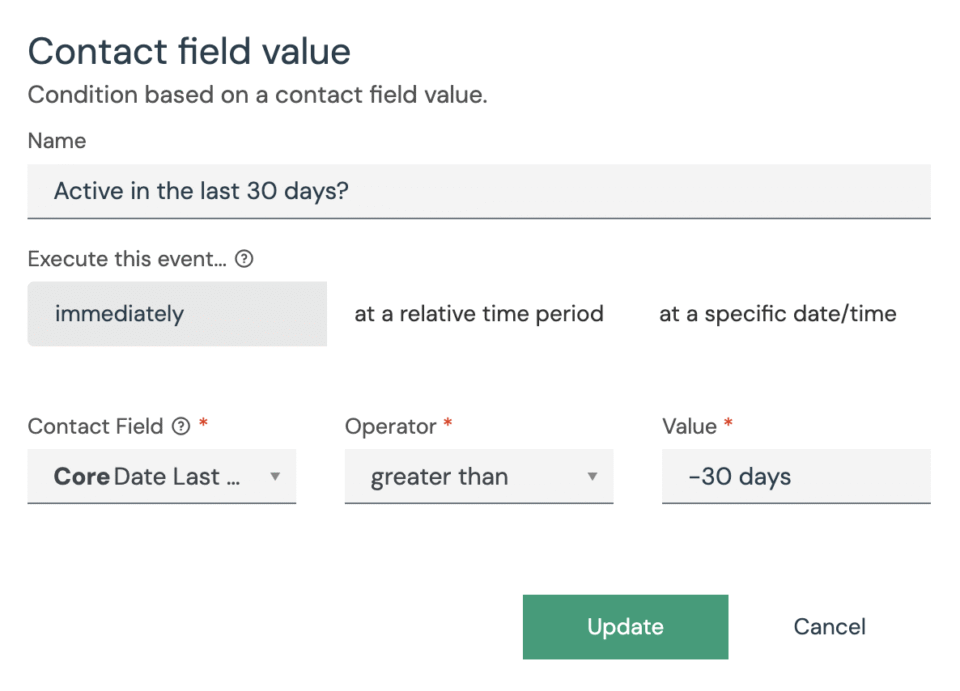
This is how you set it up:
- Create a campaign
- The segment can contain all contacts who are in the newsletter, for example, or who have performed a certain action.
- Add a condition based on a date field in the campaign
- Condition: Contact field value
- Field: Last Active Date
- Operator: greater than
- Value: -30 days
- You can enter a fixed date or a relative date as the value.
- Define the campaign flow:
- YES path: For contacts who were last active within the last 30 days.
- For example, send an e-mail with current content.
- NO path: For contacts who have been inactive for more than 30 days.
- For example, send a reactivation e-mail or a special offer.
- YES path: For contacts who were last active within the last 30 days.
- Avoid empty paths
If you do not use the No path, add an action such as “Remove from campaign” at the end so that the campaign is closed cleanly.
Example:
A contact was last active on October 1. Today is November 10th.
- In the campaign, the condition checks whether Last Active Date is within the last 30 days.
- Result: NO → The contact receives a reactivation email.
Another contact was active yesterday → YES → They receive a regular update email instead.
In short:
With the condition Contact field value condition, you can differentiate between contacts in the campaign according to their activity date. This allows you to target active and inactive contacts with different emails – however, it can often be easier if you use a segment directly.
